0%

You know, drones are really shaking things up when it comes to how companies inspect assets, map job sites, and collect field data. But here’s the thing—just having a capable drone isn’t enough to make your whole program dependable. Take wind turbine inspections, for example. You need stable imaging, batteries you can actually rely on, and some kind of sane process for sorting through thousands of photos. It’s the little choices that end up making or breaking you. You know how people used to say the skies belong to birds and airplanes? Well, Michael Huerta—the former FAA Administrator—put it pretty perfectly: “The skies are no longer just for birds and airplanes.” That quote really hits on something bigger. Drones are quietly becoming a normal part of aviation and everyday business operations now, and honestly, that shift is pretty huge.

Honestly, picking the right drone platform is about a lot more than just comparing camera specs. You've got to dig into payload options, real-world flight time—not the numbers on the box—weather tolerance, data security, software compatibility, maintenance, and how responsive the vendor is. And here's something people often forget: who's actually going to make sense of the data, and will it slip into your existing workflow without a fight? Because a drone that looks amazing in a polished demo can totally let you down on a dusty job site or halfway through a marathon inspection shift. Yeah, that definitely deserves a second look. Cost is a big one too—and I’m not just talking about the sticker price. You’ve got training, batteries that’ll need replacing, repairs, software fees... it adds up. Operational needs are all over the map depending on where you are and what you’re doing, so definitely check the rules before you start planning any flights. Honestly, there’s no perfect checklist here. Every option has trade-offs. That’s just reality. So the seven tips below are meant to help you work through those trade-offs in a practical way—picking Enterprise Drones that actually fit the job, your team, and the real-world conditions they’ll be flying in.

7 Tips for Choosing the Best Enterprise Drones

Identify the Enterprise Tasks the Drone Must Perform

Before comparing enterprise drones, define the work they must do on an ordinary day. “Inspect a site” is too vague. Specify whether the aircraft will photograph roof seams, map a stockpile, or measure heat around electrical equipment. Be specific. Each task calls for different sensors, flight times, and data quality. A wide camera may document surface damage, while thermal imaging can reveal temperature differences that need expert review. The drone should also capture enough detail from a safe, repeatable distance. A few clear sample images can help teams judge whether the results will support maintenance decisions.

Consider the conditions around the task, not just the ideal flight. A survey across several buildings may require longer battery life than a short inspection of one rooftop. Wind, dust, and narrow launch areas can affect reliability. Small details matter. Note how often the work occurs, how quickly staff need the results, and who will interpret them. For mapping, check whether outputs align with existing site plans. For inspections, decide how images will be labeled and compared over time. These requirements are easy to underestimate; even a capable aircraft can produce data that is difficult to use if the capture plan is poorly defined. Make room for a trial on a representative site, and revise the task list when real conditions expose gaps.

Enterprise Drone Mission Planning: Flight-Time Windows

Compare the approximate flight time to plan for common enterprise tasks. These are illustrative planning ranges, not measured industry averages; actual flight time depends on the aircraft, payload, weather, and required safety reserve.

Use the task requirements to guide aircraft selection, and verify usable flight time with the intended payload and operating conditions.

Match Flight Time and Range to Operational Needs

Flight time and range should match the work, not just a figure on a product sheet.

Walk the planned route on a site map, including launch points, inspection zones, and safe landing areas. Count the return leg, turns, and time spent hovering beside a structure. Wind, cold, payload weight, and battery age can reduce usable airtime. Plan for that loss. A stated forty-minute flight may leave far less time for inspection after travel and landing reserves.

Easy to misjudge.

A compact facility may need modest range, while a long utility corridor can require longer legs or planned battery changes. Keep a buffer for gusts or delayed landings, based on local conditions and operating procedures. Review flight logs across several missions instead of relying on one ideal test. Compare planned time with real time on station.

Teams can underestimate the return trip; hovering and a headwind may quickly consume reserve. Run a trial on a demanding, ordinary workday, then adjust the route, payload, or launch point.

Choose Sensors and Payloads for Required Data

Choosing an enterprise drone payload starts with the decision the data must support. Map inspection may need sharp visible-light images that reveal small cracks or loose fittings. Heat-loss surveys require thermal measurements, not simply a higher-resolution camera. For crop monitoring, a multispectral sensor may help distinguish plant stress that ordinary images miss. Define the required output before comparing equipment: a measurement, a map, or a set of reviewable images. Small details matter.

Then check whether the sensor fits the aircraft’s payload limit, mounting system, and power supply. Added weight can shorten flight time, while high data rates may strain storage or transfer workflows. Ask how the sensor is calibrated and whether its files work with your analysis tools. Test the full setup on a short route, including takeoff, image capture, and file review. Test it outdoors. A controlled trial can expose glare, vibration, or blurry images before they affect a larger survey.

It is tempting to choose the most capable sensor available, but extra features may add cost and complexity without improving the decision. Match sample images and measurements against the task’s actual requirements. Keep a record of flight conditions, settings, and sensor maintenance so results remain easier to compare. No checklist catches everything; changing light or weather can still complicate interpretation. Revise the payload choice when field results show a gap.

Evaluate Durability and Environmental Protection

A rugged airframe matters only when its protection matches the worksite. Rain on a survey site, grit near a quarry, and repeated vibration can turn small weaknesses into missed flights. The FAA’s 2024 Aerospace Forecast tracks continued growth in commercial small-drone operations, making dependable equipment a practical fleet concern—not just a purchasing preference. Check the aircraft, battery, connectors, and payload mounts as one system.

Tip: Read the IP rating carefully. Under IEC 60529, IP54 means dust protection and resistance to splashing water; it does not mean waterproof. IP65 indicates dust-tight protection and resistance to water jets, but still does not authorize immersion. Ask for test conditions, temperature limits, and maintenance requirements. A rating without those details can mislead.

Inspect seals and latches after handling, especially around battery doors and cable ports. Look for abrasion, loose fasteners, and moisture inside compartments. Review the manufacturer’s environmental test records, including wind, rain, dust, and operating-temperature tests. Then compare them with your actual sites. A lab result is useful, but it may not reproduce a week of gritty field work. I would also keep a simple inspection log; it is easy to skip when schedules get tight.

Check Safety Features and Regulatory Compliance

Check the aircraft’s safety systems before comparing payloads or flight time. Look for obstacle sensing, clear low-battery alerts, and a predictable return-to-home function. Test what happens when the control link drops. A feature list is not proof; ask for test records and review the aircraft’s behavior in a controlled, open area. FAA’s 2024 UAS-by-the-Numbers update reported more than 780,000 registered drones in the United States. That growing fleet makes reliable procedures essential, not optional.

Compliance depends on where and how the aircraft will operate. In the United States, FAA Part 107 generally requires visual line of sight and limits flight to 400 feet above ground level, subject to applicable exceptions and approvals. Check pilot qualifications, airspace restrictions, registration, and Remote ID requirements before purchase. For cross-border teams, confirm local rules rather than assuming U.S. requirements apply. Keep approvals and training records accessible to crews.

Inspect practical details, too. Can the pilot read battery warnings in bright sunlight? Is the return point configurable for a rooftop launch? Review maintenance logs, firmware controls, and emergency checklists. A polished dashboard can still hide weak field procedures. I would ask operators to rehearse a lost-link response before deployment; it is easy to overlook until the signal fails. FAA guidance and current operating rules should be checked again before each project, since requirements and site conditions can change.

Assess Fleet Management and Data Security

A capable fleet management system should show where each aircraft is, who is operating it, and whether maintenance is due. Look for a live map, clear battery-health records, and alerts for overdue inspections. Keep the workflow simple. If an operator needs several screens to find a flight log, the system may slow down a busy team. Test the dashboard with real users, not only administrators.

Data security needs equal attention. Ask how flight plans, images, and telemetry are encrypted during transfer and storage. Check whether access can be limited by role, so a contractor can view assigned missions without seeing the whole fleet. Strong audit logs should record who opened, changed, or exported data. Set retention rules before flights begin; storing every image forever creates risk and clutter. Confirm how the system handles lost devices and account access after staff leave.

Integration matters, but it can introduce weak points. Review data flows between the drone platform, mapping tools, and internal storage. A practical trial should include a simulated account compromise and a recovery check. No plan is perfect. Teams sometimes focus on impressive aircraft and overlook routine access reviews. Schedule those reviews, document exceptions, and make one person responsible for closing each security gap.

Compare Total Ownership Costs and Vendor Support

Enterprise drone costs extend well beyond the aircraft. Budget for spare batteries, charging equipment, payloads, software subscriptions, staff training, and scheduled maintenance. A low purchase price can look less attractive once replacement parts and service fees enter the spreadsheet. Small expenses add up.

Estimate costs across several years, not just the first season. Include likely battery replacements, storage needs, and downtime during repairs. Ask vendors for written service terms: response times, repair turnaround, parts availability, and loaner options. Ask for specifics. A promise of “fast support” means little without a measurable commitment.

Vendor support can shape daily operations as much as flight performance. Check whether technicians can troubleshoot remotely and whether training covers your actual workflows. Request a sample maintenance schedule and clarify what voids coverage. Then compare quotes using the same assumptions, including staff time and software renewals. One imperfect estimate is better than a confident guess, but revisit it after a pilot project. Your usage may differ from the forecast, especially when weather, workload, or repair delays change the plan.

7 Tips for Choosing the Best Enterprise Drones — Compare Total Ownership Costs and Vendor Support

Tip What to Compare Useful Data or Planning Check Vendor Support Questions
1. Start with the mission Payload type and weight, camera or sensor requirements, site conditions, and required deliverables. List each payload’s weight, power needs, data format, and required image or measurement quality. Confirm compatibility with the aircraft before comparing prices. Is payload integration included, or does it require separate engineering, software, or calibration work?
2. Compare usable flight time Expected flight duration with the actual payload, wind conditions, temperature, and required safety reserve. Use mission-specific flight-time estimates rather than headline maximums. As a planning practice, allow reserve capacity for safe return and account for time spent on takeoff, landing, and battery changes. Can the vendor provide test results for a comparable payload and operating environment?
3. Check operational fit Weather limits, operating range, launch and landing requirements, portability, and compatibility with your workflows. Compare documented operating limits against the conditions at your sites. Check applicable aviation rules, airspace restrictions, and remote-identification requirements for each operating location. Does support include help with setup, compliance documentation, and updates when operating requirements change?
4. Calculate three-year TCO Purchase price plus software, support, batteries, maintenance, training, and other recurring costs. Illustrative planning model (USD): Inspection kit — $12,000 purchase + $4,000/year recurring = $24,000 over 3 years; mapping kit — $28,000 + $8,000/year = $52,000; heavy-payload kit — $55,000 + $13,000/year = $94,000. Formula: purchase cost + 3 × annual recurring costs. Which items are included in the quote, and which incur separate fees, renewals, or usage charges?
5. Include batteries and repairs Battery cost and replacement assumptions, charging equipment, spare parts, routine inspection, and repair costs. Estimate how many batteries are needed per shift and how often they may need replacement under your expected usage. Add shipping and downtime costs for repairs to the ownership model. Are batteries and common replacement parts stocked locally? What are typical repair turnaround times, and are loaner units available?
6. Evaluate support quality Support hours, response channels, escalation process, repair service, and software-update policy. Set service targets that match operational needs—for example, a one-business-day initial response for standard requests—and request the terms in writing. Distinguish response time from resolution time. Is support available during your operating hours? What are the service-level terms, exclusions, and escalation steps?
7. Verify training and scale-up Operator and maintenance training, onboarding, data workflow support, fleet management, and future expansion costs. Compare training seats, course format, certification prerequisites, and fees for additional users. Test whether the proposed workflow can handle your expected fleet size and data volume. Are onboarding and refresher training included? How are firmware, software, and security updates communicated and supported?
Cost figures are illustrative budgeting estimates, not vendor quotations or guaranteed market prices. The example three-year totals exclude labor, taxes, insurance, connectivity, financing, and costs not listed in the model; replace the assumptions with written quotes for your intended configuration and workload.

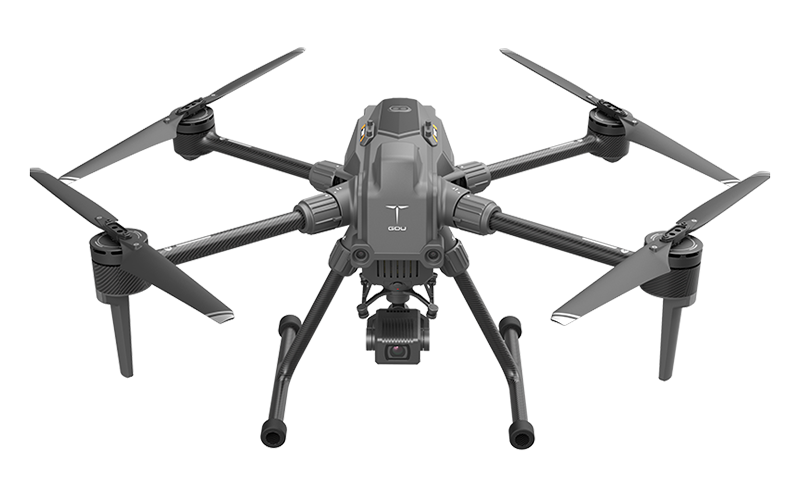
Enterprise Drone Trends: Insights from Drone Industry Insights’ 2024 Drone Market Report and the GDU S200

Drone Industry Insights’ 2024 Drone Market Report points to a growing commercial market, forecasting that the global drone industry will surpass $54 billion by 2030. The opportunity is increasingly defined not by aircraft alone, but by the quality of the work they enable: repeatable inspections, timely site data, and efficient operations across infrastructure, energy, construction, and other industrial settings. As organizations seek measurable returns, dependable performance and practical workflows are becoming central to adoption.

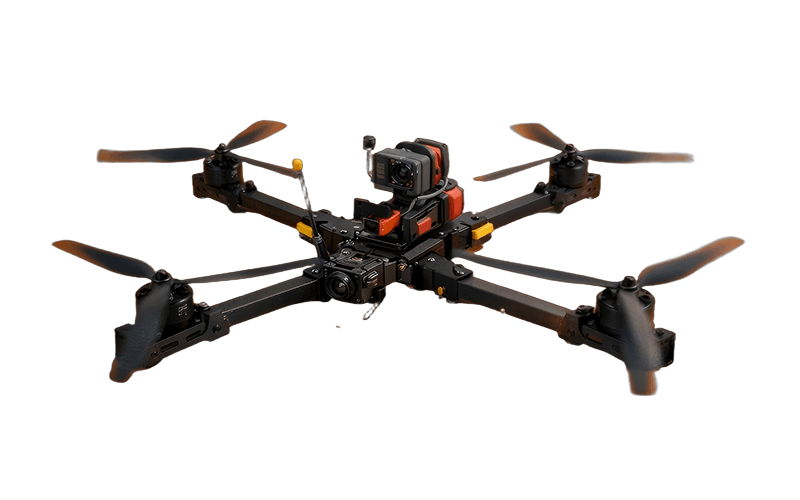
An industrial flagship should therefore represent a new level of application, turning aerial data capture into a useful part of everyday operations. A platform such as the S200 can be positioned around that goal: supporting professional teams as they collect consistent information, assess assets, and plan follow-up work. The strongest value comes from matching the aircraft, payload, and software workflow to a specific task, while making training, maintenance, and data handling manageable. This application-led approach reflects the direction suggested by the market outlook: enterprise growth depends on solving operational problems, not simply adding more flight capability.

FAQS

How should a team define its drone tasks?

Name the exact job, such as photographing roof seams or mapping a stockpile. “Inspect a site” is too vague.

Which conditions should teams consider before flying?

Consider wind, dust, launch space, flight frequency, and how quickly staff need results. Test at a representative site.

How do teams choose the right sensor?

Match the sensor to the decision. Visible-light images can show cracks, while thermal measurements can reveal heat differences.

What should teams check when adding a payload?

Check weight, mounting, power, storage, and file compatibility. Added weight may shorten flight time.

Why test the full setup outdoors?

A short outdoor route can reveal glare, vibration, or blurry images. Test the files, too.

What costs should a drone budget include?

Include batteries, charging equipment, sensors, software, training, maintenance, and repair downtime. Small costs add up.

What support details should teams request?

Ask for written repair times, parts availability, training details, and loaner options. “Fast support” needs specifics.

How can teams keep results comparable over time?

Record flight conditions, settings, and sensor maintenance. Changing weather can still complicate comparisons, so review the process.

Conclusion

Choosing the right Enterprise Drones starts with defining the work they need to do, such as inspection, mapping, or monitoring. Match flight time and range to the size of the operating area and the time available for each mission. Then select sensors and payloads that can capture the data you need, while considering whether the drone can carry them without compromising performance.

Look for durable construction and environmental protection suited to the conditions where the aircraft will operate. Review safety features, operator requirements, and applicable regulations before making a decision. For larger operations, assess fleet management tools and safeguards for stored and transmitted data. Finally, compare the total cost of ownership—including maintenance, training, batteries, and support—rather than focusing only on the initial purchase price. A careful evaluation of these factors can help organizations choose a reliable solution that fits both operational needs and budget.

Charlotte

Charlotte

Charlotte is a dedicated marketing professional with a deep expertise in the UAV systems developed by UUUFLY. Her commitment to integrated innovation across hardware, algorithms, and data operations positions her as a driving force in delivering cutting-edge solutions for power, agriculture, and......
Previous What Are the Best Business Drones in 2026?